Action pose reference
Dynamic pose reference for characters in motion
Action poses are hard to shoot and harder to hold. Build them in 3D instead: a sprint, a kick or a fall, seen from the dramatic low angle your panel needs.
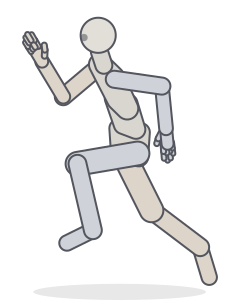
SprintOpen in Studio 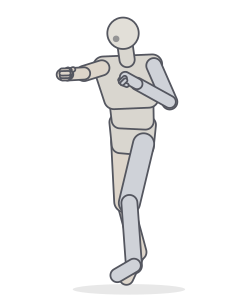
Right crossOpen in Studio 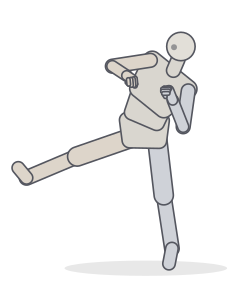
Side kickOpen in Studio 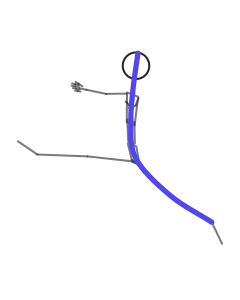
Split leapOpen in Studio 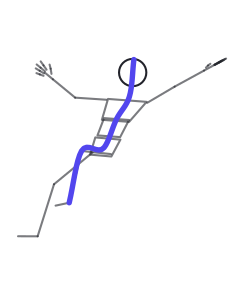
Falling backwardOpen in Studio 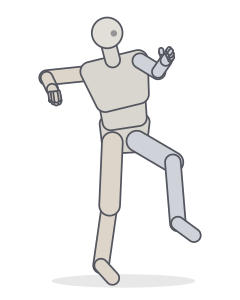
Throwing wind-upOpen in Studio
What makes a pose dynamic
A dynamic pose communicates movement and intent before the viewer reads any detail. Three things do most of the work:
- A strong line of action. One clear curve, or a straight diagonal, running from the head through the spine into the driving leg. Turn on Line of action in the Studio to see it drawn over the pose.
- Imbalance. Static poses keep the centre of mass over the feet; action poses throw it forward or off to the side. Turn off Balance and raise Lean to push a random pose past its tipping point.
- Twist and asymmetry. Shoulders and hips rotating against each other create tension. The Asymmetry control adds that twist to generated poses.
Using Random Pose for action ideas
Random Pose isn’t random rotation. It starts from one of 19 action templates, including running, jumping, landing, punching, kicking, falling and dancing, and varies them within anatomical limits. Choose an action in the dropdown, set Energy high, and press R a few times. Each result has a seed, so you can return to it or share it later.
Fighting pose reference
Start with the boxing guard to get the stance right: bladed hips, chin tucked, weight on the balls of the feet. Then step through the right cross and uppercut presets to see how the hips lead the shoulders. For kicks, compare the front kick with the side kick: in the side kick, the whole torso tilts away to keep a straight line from head to heel.
Running pose reference
The running and sprint presets show the flight phase, the moment both feet are off the ground, which reads as fastest on the page. Note the opposition: left knee forward, right arm forward. View it from the side (3) to check the forward lean, and from a low angle (7) for a heroic, towering read.
Hands, props and body types
Action reads through the hands as much as the body. Close the fists for a fight, use Grip to hold a staff or sword from the Props section, or Spread for a fall. For stylised characters, switch the body type to Heroic for broad shoulders and long legs, or to Chibi for a big head on a short body. The same pose adapts to the new proportions.
Key poses and in-betweens
Action rarely lives in a single frame. Put the anticipation, the strike and the follow-through on the Studio timeline as keys, and scrub between them to find the most readable frame for your panel. Turn on onion skin to see the previous and next key as ghosts, or export a contact sheet and pick the strongest silhouette.
 ◆ key
◆ key frame 5
 frame 10
 frame 14
 frame 19
 ◆ key
◆ key
Camera choices for action
Low angles make characters feel powerful; high angles make them vulnerable or show the ground they cover. A wide field of view (60° or more) exaggerates perspective so a punch thrown at the camera looms large. Turn the FOV up and orbit until the fist leads the composition.
Frequently asked questions
How do I make a pose look more dynamic?
Exaggerate the line of action, move the centre of mass outside the feet, and twist the shoulders against the hips. In the Studio, raise Energy and Lean, turn off Balance, and switch off Biological constraints for stylised extremes.
Can I get the same random pose again?
Yes. Every random pose shows its seed. Enter the same seed with the same Energy, Asymmetry, Lean and Balance settings to get the identical pose, or share a link that stores it.
Can I pose hands and fingers?
Yes. Every finger has two joints. Pick a hand shape (fist, point, grip, spread and more) or set each finger’s curl, then add a held prop such as a staff or sword.
Can I pose two characters together?
Yes. Add up to four figures, place and turn each one, and pose them separately: a punch and a block, a dance lift, a group shot. Click a figure to edit it.
Can I change the body type?
Yes. Choose Standard, Heroic, Slender, Stocky, Curvy, Child or Chibi proportions, or adjust head size, limb length, shoulder and hip width and build individually.
Keep practising
Build the action, then draw it
Generate a dynamic pose, find a dramatic angle, export it.